Delay, import on demand, lazy-load: three tools, and which one each component needs
Phases 3 to 6 of a Shopify performance programme: the three ways to move code off the critical path, the rule for choosing between them, and the readings from 51 to 95.
Once a theme loads only the code each page needs, the next question is when. Most of what a storefront page loads is not needed for the first paint, and there are three different ways to say so. Using the wrong one is how you end up with a cart drawer that opens empty.
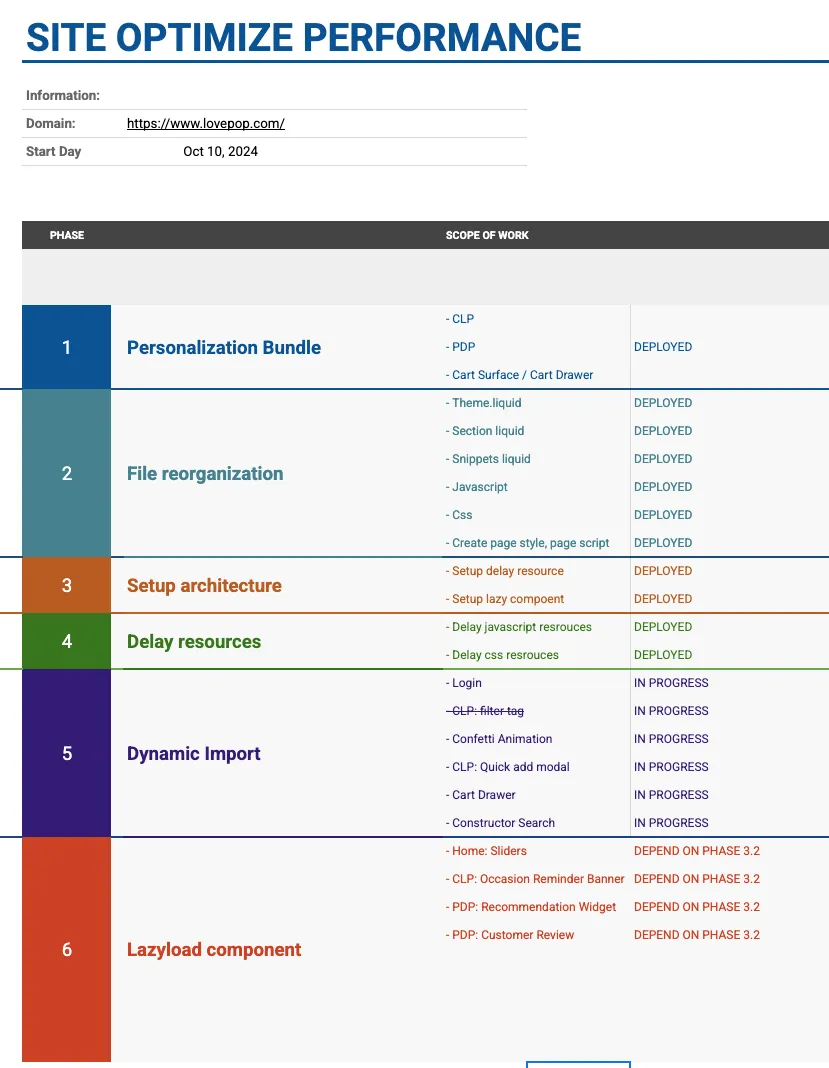
This is how phases 3 to 6 of the Lovepop programme sorted every component into one of the three, and what the score did as each batch shipped.
Phase 3: build the tools first
Before moving anything, we built two small pieces of infrastructure and shipped them with nothing using them.
A delay helper: a resource is registered rather than loaded, and the helper loads it after first paint, or on the first interaction, whichever is sooner. A lazy component helper: a section renders a placeholder with the right dimensions, and an intersection observer swaps in the real thing when it nears the viewport.
Shipping them empty sounds odd. It let us test the helpers on their own, and it meant each later phase was a data change, not a code change.
The three tools
Delay is for things the page will need, just not yet. Analytics, the chat widget, the A/B testing library. Nothing about them depends on what the visitor does.
Import on demand is for things that run only after an action. The cart drawer loads when the cart icon is tapped. The login form loads when someone opens it. The quick-add modal on collections, the search, the confetti animation on the product page after an add to cart. The visitor’s tap is the import.
Lazy-load is for things that are visible, but further down. The home page sliders, the occasion reminder banner on collections, the product recommendations and the customer reviews on the product page. They load as they scroll into view.
The rule for choosing: if it has a trigger, import on it. If it has a position, lazy-load at it. If it has neither, delay it.
The one that bites
Import on demand has a failure mode: the tap arrives, the code has not, and nothing happens for 300ms. The fix is to warm the import on hover or on first scroll, so by the time the tap lands the module is usually there. The cart drawer got this treatment. The login form did not need it; nobody minds a short wait on a form they just asked for.
The readings
- June 2025, phase 4 part-shipped: 59.
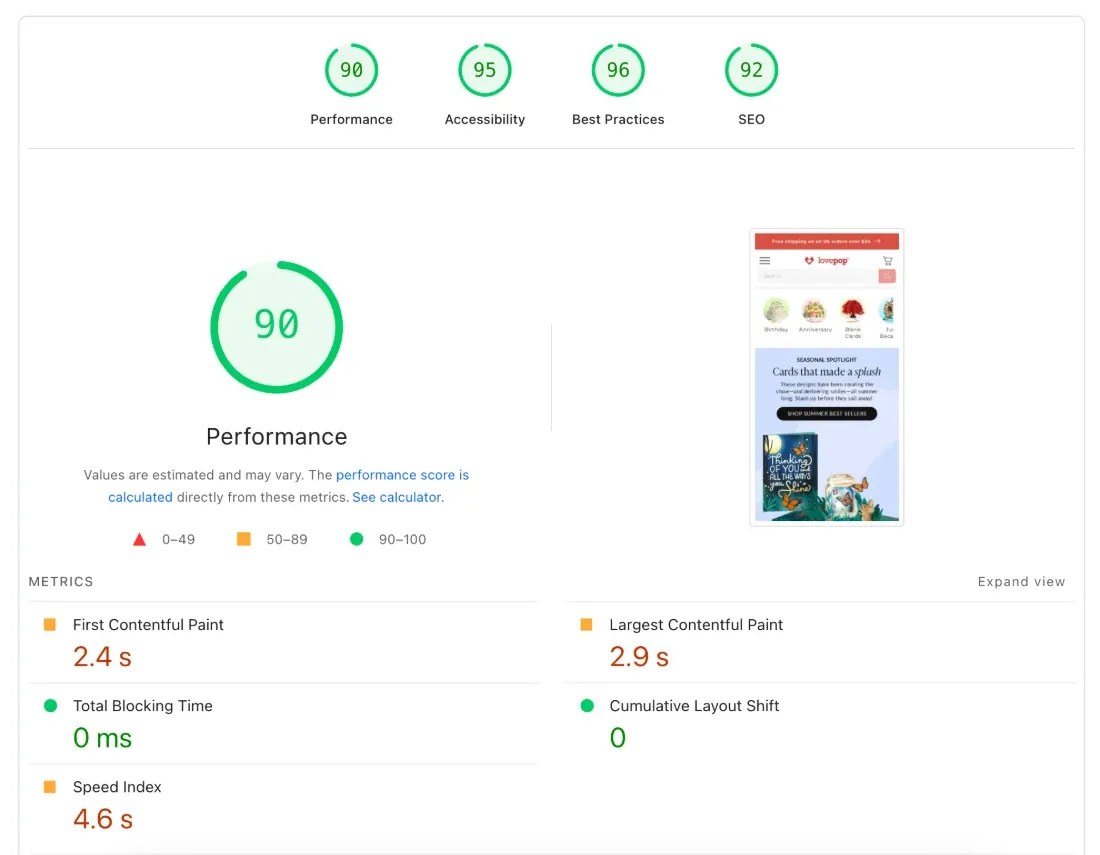
- 30 July 2025, PageSpeed Insights, mobile: 90. Total Blocking Time 0ms, Cumulative Layout Shift 0. First Contentful Paint 2.4s and Speed Index 4.6s were still amber: the main thread was free, but the first paint was still waiting on fonts and the document.
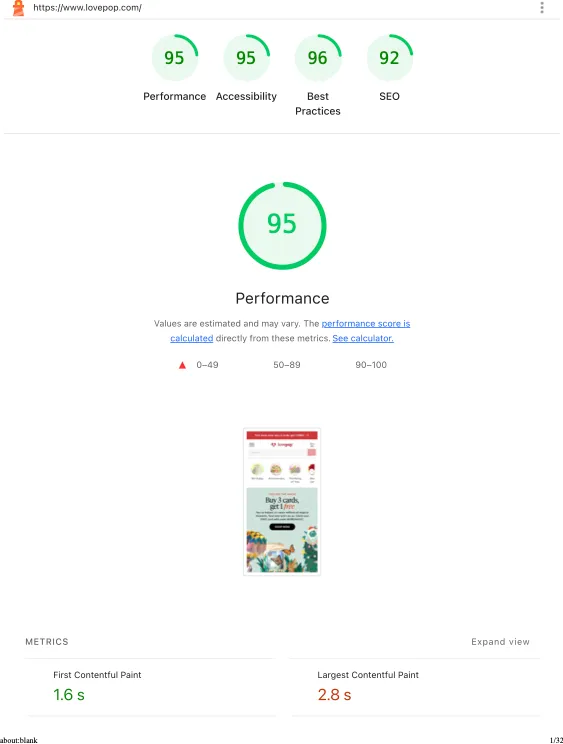
- 27 September 2025, Lighthouse, mobile: 95. First Contentful Paint 1.6s, Largest Contentful Paint 2.8s, Total Blocking Time 0ms, Speed Index 2.7s. Main-thread work was down from 18.2s to 3.2s.
Total Blocking Time at zero is the one I would point at. It is the difference between a page that ignores your tap and one that does not, and it went from 820ms to 0 without removing a single feature from the site.
What was left in the report
A 95 still has findings. On 27 September the top ones were the document request itself (the server responded in 641ms), font display on the Lato and IvyPresto web fonts (610ms of estimated savings), and a cache-control: no-store header that stops the page entering the back/forward cache. None of them is JavaScript. That is what a finished programme’s report looks like: the remaining items belong to the platform and the fonts, not to the theme.