Safe theme releases, no developer needed
A simple Shopify and GitHub setup that lets the merchandising team change and release the store on their own, with very little risk.
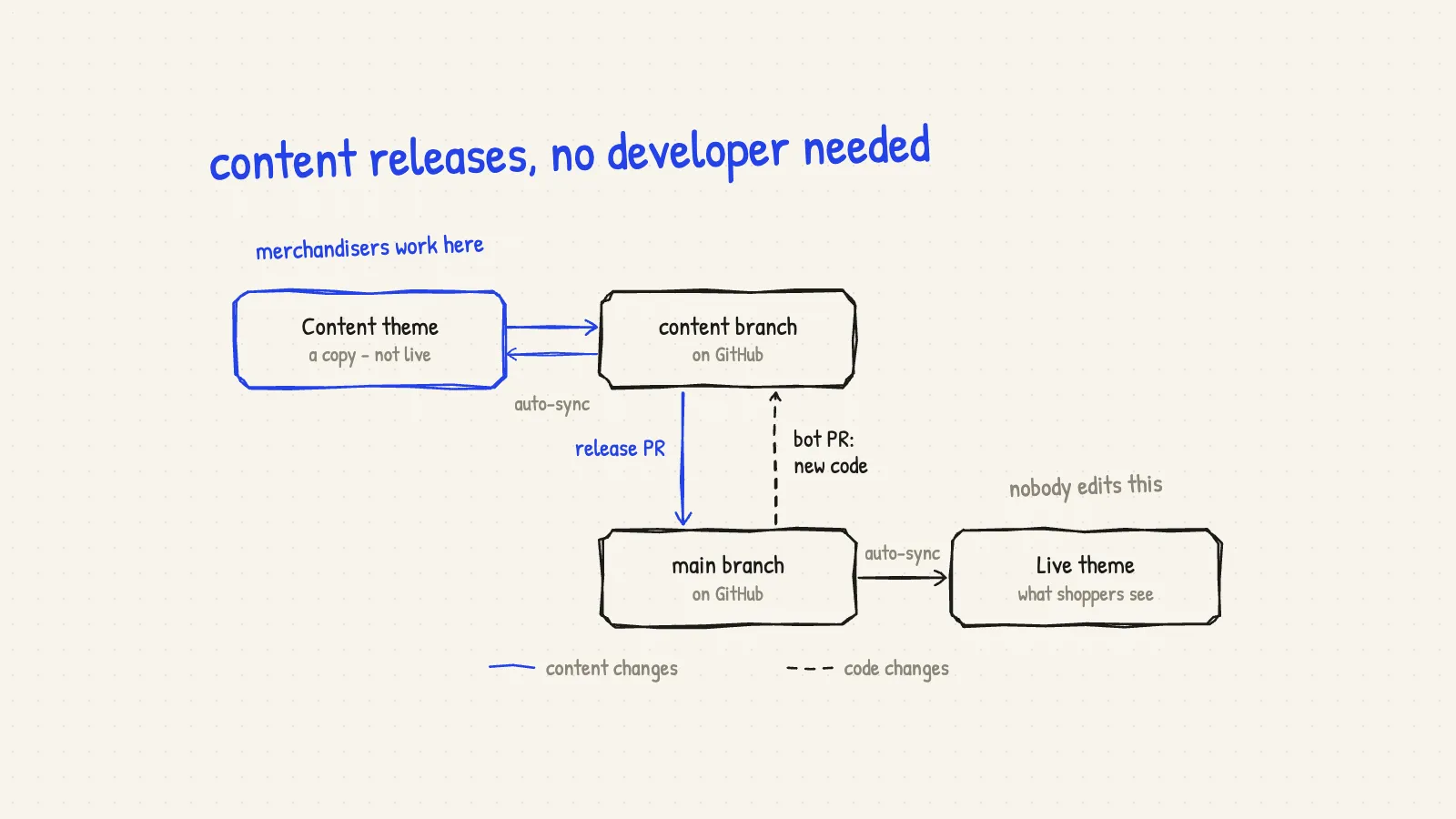
Most Shopify stores have the same small problem.
The merchandising team wants to change the store every day. A new banner. A new photo. A sale message. A different order of sections on the home page. These are small changes, and they are their job.
But there are only two common ways to do it, and both are bad.
Way one: they edit the live theme. It is fast. But every mistake goes straight to the shoppers. A broken banner is live the second you click save. And the code in GitHub is now different from the live store, so the next developer release can quietly undo their work.
Way two: they ask a developer. It is safe. But now a text change waits in a queue behind real engineering work. A one-minute change takes two days. Everybody is unhappy.
There is a third way. Merchandisers do all the work themselves, release it themselves, and the risk stays very low. This post shows the setup, step by step.
The idea in one sentence
Merchandisers never touch the live theme. They work on a copy. When they are happy, the copy is sent to the live theme through GitHub, with a quick check on the way.
That is all. The rest of this post is the details.
The setup
There are four parts. Two of them are themes in Shopify. Two of them are branches in GitHub. A branch is just one version of the theme code.
- The live theme is what shoppers see. It is connected to the
mainbranch in GitHub. Whenmainchanges, the live theme changes by itself. Nobody edits the live theme in the Shopify admin. Not merchandisers, not developers. - The
mainbranch is the single source of truth. Every change reaches the live store through here. - The content theme is a copy of the live theme. It is not published, so shoppers never see it. This is where the merchandising team works, every day, in the normal theme editor they already know.
- The content branch is connected to the content theme. Shopify’s GitHub integration keeps them in sync both ways: when a merchandiser clicks save in the editor, Shopify saves that change to the content branch for them. Nobody has to know git.
So content moves in one direction: content theme → content branch → main → live theme.
How a content release works
Here is what a normal day looks like for the merchandising team.
- Edit the content theme. Open it in the theme editor. Change the banner, the text, the order of sections. Preview it on desktop and on a phone.
- It saves to GitHub by itself. There is nothing to do here. Every save is already in the content branch.
- Ask for a release. Send a short message: what changed, and when it should go live. “New autumn banner on the home page, please release before 9am.”
- A quick check. Someone opens the preview of the content theme and looks at the changed pages. This person does not need to be a developer. It can be a lead, a team-mate, or an internal support team.
- Release pull request into
main. A pull request is a request to add changes tomain. GitHub shows every changed file and every changed line, so the person can see exactly what will go live before they say yes. They click Merge. - The live theme updates. Shopify picks up the new
mainand the live store changes within a minute.
The merchandising team owns steps 1 to 3. Steps 4 and 5 take a second person a few minutes. No developer is involved at any point.
What about new code from developers?
Developers keep working the normal way. They build a new section or fix a bug, open their own pull request, and merge it into main. The live theme gets the new code.
But now the content theme is behind. It does not have the new section yet, so merchandisers cannot use it.
This is where a small robot helps. A GitHub Action watches main. Every time new code lands there, it opens a pull request from main back into the content branch. Someone merges it, and a moment later the content theme has the new code too.
That is the dashed line in the first picture. Content flows down to live; code flows back up to the content theme. The two themes never drift far apart.
Why the two flows rarely clash
You might ask: if merchandisers and developers both change the theme, what happens when they change the same thing?
The good news is that they almost never do. In a Shopify theme, content and code live in different files.
- When a merchandiser changes a banner or moves a section, Shopify writes that to JSON files: the files in
templates/, andconfig/settings_data.json. - When a developer builds something, they change Liquid files and assets:
sections/,snippets/, CSS and JavaScript.
Different files means Git can put the two together on its own, with no conflict.
One file needs a little care: config/settings_data.json. It holds the theme’s global settings, and both teams can touch it. Two simple rules keep it calm:
- Developers do not change global settings in the same week as a big content release, unless they talk to the merchandising team first.
- If GitHub ever shows a conflict in that file, the merchandising team stops and asks a developer. It is a five-minute fix for someone who has seen it before.
Where mistakes get caught
Nothing here stops people from making mistakes. People will always make mistakes. The setup simply makes sure a mistake is caught before shoppers see it, and is easy to undo if it is not.
- Never edit the live theme. Half-done work stays in the content theme. Shoppers never see a banner with the wrong date while someone is still typing.
- Check the preview link. A quick look at the content theme preview catches most problems: a broken layout, the wrong image, a typo in a price.
- Read the pull request. GitHub lists every file that will change. A content release should only show JSON files. If it shows a Liquid file or a CSS file, something is wrong, and the reviewer can stop and ask.
- Revert in one click. Every release is one pull request, so every release can be undone. GitHub has a Revert button on merged pull requests. Click it, merge the revert, and the live store goes back to how it was.
Each gate is small and cheap. Together they make releases boring, and boring is exactly what you want from a release.
Who does what
| Merchandising team | Reviewer | Developers | |
|---|---|---|---|
| Edit content | Yes, in the content theme | - | - |
| Ask for a release | Yes | - | - |
| Check the preview | Can help | Yes | - |
| Merge the release pull request | - | Yes | - |
| Build new sections | Ask for them | - | Yes |
Merge code into main | - | - | Yes |
| Fix a rare conflict | Report it | - | Yes |
The reviewer is any trusted person who is not the author. Two pairs of eyes are better than one, and that is the whole job.
Small rules that keep it safe
- One content theme only. Two copies means two versions of the truth. Keep one.
- Small releases, often. A release with one banner is easy to check and easy to undo. A release with forty changes is not.
- Release at a quiet time. Not during a big sale, not five minutes before a campaign email goes out.
- Write a clear title on every release. “Autumn banner + new FAQ text” is better than “updates”. In three months, someone will be glad you did.
- Lock
main. In GitHub, turn on branch protection so nobody can push tomainwithout a pull request. This one setting protects the whole system.
What you need to set it up
If you want to try this on your own store, this is the full list:
- Connect your theme code to a GitHub repository, with a
mainbranch. - In Shopify, connect the live theme to
mainusing the GitHub integration. - Create a content branch from
main, add a new theme from it, and keep that theme unpublished. This is your content theme. - Add a GitHub Action that opens a pull request from
maininto the content branch every timemainchanges. - Turn on branch protection for
main. - Show the merchandising team where the content theme is, and how to ask for a release.
It takes about a day to set up. After that, it mostly runs by itself.
What changes for the team
The merchandising team stops waiting. They can change the store in the morning and see it live before lunch, without asking a developer for anything.
Developers stop doing small text changes and can spend their time on real work.
And the live store gets safer, not riskier. Every change is checked, every change is written down, and every change can be undone.
If you want the story of how we automated the other direction - finding changes that were made straight on the live theme and turning them into pull requests - read Theme deploys that do not need a developer awake.